
Someone on your lot is already using ChatGPT. Maybe it’s the salesperson drafting follow-up texts, the office manager rewriting a policy, or you. That’s mostly good news. The one habit worth stopping today is pasting customer paperwork into a chat window to save a minute.
This is the post to forward to your staff: what counts as customer information at a dealership, why the law cares, how the AI plans differ, and how to get help with a deal without handing over the customer.
It’s general information, not legal advice. Your attorney and the FTC’s own guidance are the final word for your store.
The short version
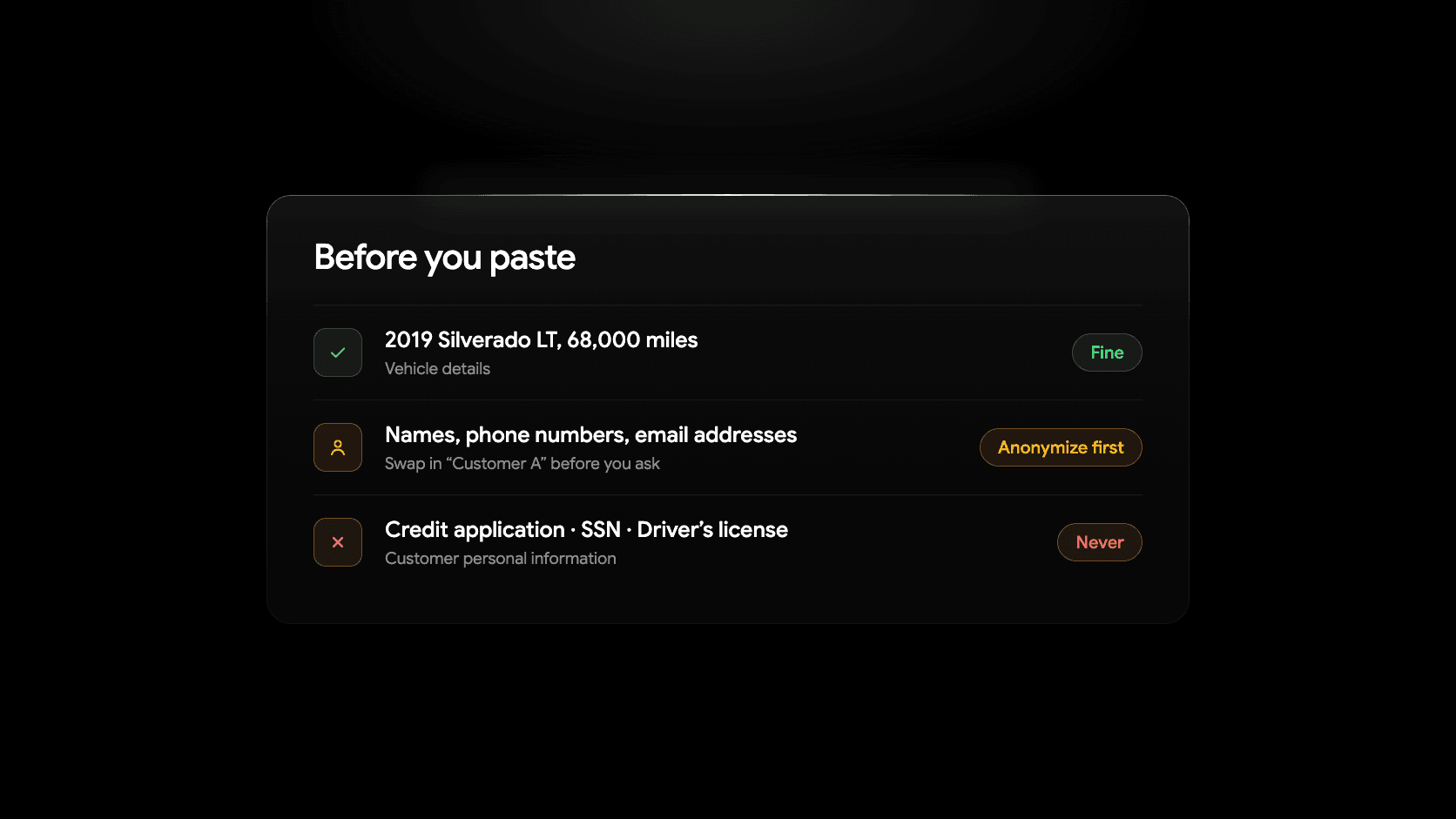
- Red: anything from a credit application, a driver’s license, a Social Security number, pay stubs or bank statements, a deal jacket, a payoff letter or a buyer’s order with the customer’s details on it. Don’t paste it into a general AI chat tool.
- Yellow: names, phone numbers, email addresses and anything that shows who financed or leased a vehicle from you. Strip it out first, or use a business plan your dealership controls.
- Green: vehicle facts, your own listings and photos, your policies, your ad copy and anonymized questions about a deal. Paste away.
The rest of this post explains why the lines sit where they do.
What counts as customer information at a dealership
If you arrange financing, your office handles more sensitive information than most small businesses. A single deal can include:
- The credit application: Social Security number, date of birth, income, employer, housing payment and references.
- Identity documents: driver’s license scans and copies.
- Proof of income and residence: pay stubs, bank statements, tax returns, utility bills.
- The deal jacket: buyer’s order, retail installment contract, lender approvals, stipulations.
- Trade and payoff details: the customer’s lender, account number and payoff amount.
- Lists built from any of this: a spreadsheet of who financed with you, who was turned down and who is up for a refinance.
The FTC’s Safeguards Rule calls this “customer information”: any record containing nonpublic personal information about a customer of a financial institution, in paper, electronic or any other form (16 CFR 314.2). The FTC’s auto dealer FAQs say that includes anyone who applies to you for credit, whether or not the deal closed, and lists built from financing records, such as a spreadsheet of customers who financed or leased from you (FTC, Automobile Dealers and the FTC’s Safeguards Rule, June 2025).
A plain name and address on their own aren’t covered, according to the same FAQs, unless they reveal that the person financed or leased a vehicle. Most lists in a dealership do, which is why names and numbers sit in yellow rather than green.
Why it matters: the FTC Safeguards Rule in plain language
The Gramm-Leach-Bliley Act requires “financial institutions” to protect customer information, and the FTC’s Safeguards Rule (16 CFR Part 314) says how. The definition is about activities, not what your sign says. The FTC’s auto dealer FAQs put it directly: dealers who finance, or facilitate the financing of, vehicles for consumers are financial institutions for purposes of the Rule, and so are dealers who lease vehicles for longer than 90 days.
The Rule took effect in 2003 and was expanded in 2021. As of October 2026, the FTC’s business guidance says a covered dealer must:
- Have a written information security program sized to the business and the sensitivity of the information it holds.
- Designate a Qualified Individual to run that program. It can be an employee or someone at a service provider, and no particular degree or title is required. If an outside provider fills the role, a senior employee still has to supervise them.
- Base the program on a written risk assessment and update it as risks change.
- Train staff, with security awareness training for everyone and refreshers over time.
- Oversee service providers by choosing ones that can maintain appropriate safeguards and holding them to it.
- Keep a written incident response plan.
- Report breaches to the FTC. Since May 2024, a “notification event,” meaning unauthorized acquisition of unencrypted information on at least 500 consumers, must be reported to the FTC as soon as possible and no later than 30 days after discovery. The FTC may make those reports public (FTC press release, October 27, 2023).
Dealers holding information on fewer than 5,000 consumers are exempt from some of these requirements, so check the guidance for how that applies to you. The duty to protect what you hold doesn’t end when the deal does. The FAQs say you must keep protecting information you obtained from a customer even after they’re no longer a customer, for as long as you have it.
Where does ChatGPT fit? When an employee pastes a credit application into a chat tool, your dealership has shared customer information with an outside service, on terms nobody at the store reviewed, often through a personal account. Pasting isn’t automatically a breach, but it’s a risk your program should have an answer for, and “we told everyone not to” is the cheapest answer there is.
Is ChatGPT safe for business? What the plans actually say
Whether an AI tool is safe for your data depends less on the brand and more on which plan you’re on and how it’s set. All of the policies below were checked in October 2026. These products change often, so read the linked page before you rely on it.
ChatGPT (OpenAI)
- Free, Plus and Pro. On personal accounts, OpenAI says data sharing for model training is on by default. You can turn off Improve the model for everyone under Settings, then Data controls, and keep your chat history. If you give a thumbs up or down on a reply, the whole conversation may be used for training even if you opted out (Data controls in ChatGPT).
- Temporary chat. Temporary chats don’t appear in history, don’t create memories and aren’t used to improve OpenAI’s models, but they may be kept for up to 30 days for safety purposes (same page).
- Business and Enterprise. ChatGPT Team was renamed ChatGPT Business on August 29, 2025 (OpenAI). OpenAI says it doesn’t train on content from Business, Enterprise, Edu or Healthcare workspaces by default, and those workspaces have organization-level retention, compliance and access settings. Customer-controlled retention is listed for Enterprise, Healthcare and Edu, so if a set retention period matters to you, confirm what your plan includes (Enterprise privacy at OpenAI, updated January 8, 2026).
Claude (Anthropic)
- Free, Pro and Max. Anthropic asks consumer users to choose whether their chats can be used to improve Claude. If you allow it, data is kept for five years; if you don’t, the standard 30-day retention applies. Deleted conversations aren’t used for future training. The setting lives under Privacy Settings and can be changed anytime (Anthropic, August 28, 2025; privacy.claude.com). Incognito chats aren’t used to improve Claude regardless of the setting, and thumbs-up or thumbs-down feedback may be kept and used.
- Team and Enterprise. Claude for Work (Team and Enterprise) and the API are covered by Anthropic’s commercial terms. Anthropic says it won’t use those chats or coding sessions to train its models unless you opt into its Development Partner Program or submit explicit feedback (privacy.claude.com, March 16, 2026).
Gemini (Google)
- Personal Google accounts. With the Keep Activity setting on, Google saves your chats and uploads to Gemini Apps Activity and uses them to improve its services, including training AI models. A subset of chats is reviewed by humans, and reviewed chats are kept for up to three years even if you delete your activity. Google’s own advice is not to enter confidential information you wouldn’t want a reviewer to see. With Keep Activity off, or in a temporary chat, chats are kept for 72 hours and not used for training (Gemini Apps Privacy Hub, updated October 2026).
- Google Workspace accounts. Google says it does not use Workspace content to train or improve its generative AI models, and Gemini features in Workspace apps don’t use your content for training (Google Workspace). A work account and a personal Gmail account behave very differently here, so check which one your staff are signed into.
What this means for a dealership
A business plan on any of the three is the right starting point if AI is part of how your store works: no training by default, an admin who can see who’s in the workspace, and a tool your Qualified Individual can actually review as a service provider. If you’re weighing plans, the comparison post covers cost and fit.
A business plan is still not permission to paste the red list. “Not used for training” is a smaller promise than “safe for a credit application.” The data still leaves your systems and still has to be covered by your security program.
How to ask AI about a deal without sharing the customer
Almost every question a salesperson or F&I manager has about a deal can be asked without the customer’s identity. The trick is to swap specifics for placeholders and leave out anything that could identify the person.
Before (don’t send this):
Maria Hernandez, 555-201-8834, is at 612 credit with $4,200/mo income and wants
the 2019 Silverado stock #4471 at $450/mo. Her bank payoff is $9,350. Write a
text that gets her back in.
After (fine to send):
Customer A wants a 2019 Silverado and is set on a payment around $450 a month.
Credit is below average and they have a trade with negative equity. Write a
short, friendly text inviting them back to look at options. Don’t mention any
numbers.
Same help, nothing to lose. The habits:
- Use labels, not names. “Customer A,” “the shopper,” “the buyer.”
- Round the numbers. “Around $450,” “about 90,000 miles,” “low 600s” instead of exact figures that could be matched to a file.
- Keep identifiers out entirely. No phone, email, address, employer, lender account number or VIN tied to a person.
- Describe the situation, not the paperwork. “They have negative equity” instead of the payoff letter.
- Ask for the draft, then add the specifics yourself in your CRM or messaging tool, where the data already lives.
For more prompts written this way, see the prompt cheat sheet and the AI starter guide for salespeople.
Red, yellow and green: examples
Red: never paste into a general AI chat tool. Credit applications, SSNs, dates of birth, driver’s license scans, pay stubs, bank statements, tax returns, deal jackets, retail installment contracts, lender approvals, payoff letters, account numbers and customer lists tied to financing. If AI needs to touch this, it goes through a vendor your security program has reviewed.
Yellow: anonymize first. Customer names, phone numbers, email addresses, home addresses, a CRM export, a lead-form submission, a screenshot of a text thread, or a review with the customer’s full name. Strip the identifiers out as shown above. On a business plan your dealership administers, follow whatever your written program allows.
Green: paste freely. VINs and vehicle specs, your own inventory listings, photos of cars, dealership policies, job descriptions, ad and social copy, website text, public reviews, your pricing strategy, questions about processes and laws, and anonymized deal scenarios. Still check the output for accuracy before it reaches a customer.
One note on the edges: a VIN by itself is green, and a VIN next to a customer’s name is yellow.
What to do if someone already pasted something sensitive
It will happen. Treat it as a process problem, not a firing offense, or nobody will tell you the next time.
- Delete the chat from the account it was pasted into. Delete it from the trash or archive too, if the tool has one.
- Check the settings on that account. If training was on, turn it off. Note which plan and account type it was, personal or business.
- Tell the manager or your Qualified Individual the same day, with what was pasted, when and into which tool.
- Assess it under your security program. Your written program and incident response plan should say how to evaluate an event like this and whether it rises to something you need to document or report. If it involves information on 500 or more consumers, the FTC’s 30-day notification clock is the one to know about, and it starts at discovery.
- Fix the gap. Usually that means a short staff reminder, a business plan instead of personal accounts, or both.
If you’re unsure whether an event needs reporting, that’s the moment to call your attorney.
A policy you can forward today
If your store doesn’t have an AI rule yet, this one fits on a sticky note:
- Use the dealership’s AI account, not your personal one.
- Never paste customer paperwork or numbers into a chat tool.
- Swap names for “Customer A” and round the figures.
- Read everything AI writes before a customer sees it.
- If you paste something you shouldn’t have, delete it and tell your manager.
Write it down, add it to the training your Safeguards program already requires, and revisit it when the tools change.
Everything here is general information, not legal advice. The FTC’s Safeguards Rule guidance and its auto dealer FAQs are the official sources, and your attorney knows your store.
Keep reading
- AI for car dealerships: a practical guide for independent lots
- ChatGPT vs. Claude vs. Gemini vs. Copilot: which AI should a car dealer pay for?
- AI for car salespeople: a plain-English starter guide
- The car dealer’s prompt cheat sheet
- Car dealership lead generation: a guide for independent dealers
- Meet your next CRM. Powered by AI.