
If you’ve typed “write a description for a 2019 RAV4” into ChatGPT and gotten back three paragraphs of “Experience the perfect blend of style and performance,” the problem wasn’t the tool. It was the prompt.
A vague prompt gets a generic answer that could belong to any dealership in the country. A specific prompt gets a draft that sounds like your lot, written in seconds and ready for a quick edit.
This post gives you a simple formula, then a cheat sheet of copyable prompts for the jobs that eat up a dealer’s week. It works in ChatGPT, Claude, Gemini or Copilot, free plans included. If you haven’t picked a tool yet, our comparison of ChatGPT, Claude and Gemini for car dealers covers that, and our starter guide for salespeople covers the basics.
Why AI answers sound like a robot
Give an AI tool almost nothing to work with and it fills the gaps with the most average version of what you asked for. Ask for “a car listing” and you get the average car listing: long, salesy, full of adjectives and short on facts. You don’t fix that by asking it to “sound more human.” You fix it by giving it what a new hire would need: who the reader is, what the vehicle is, what the writing is for, how long it should be and how the dealership likes to sound.
A five-part formula for better AI prompts
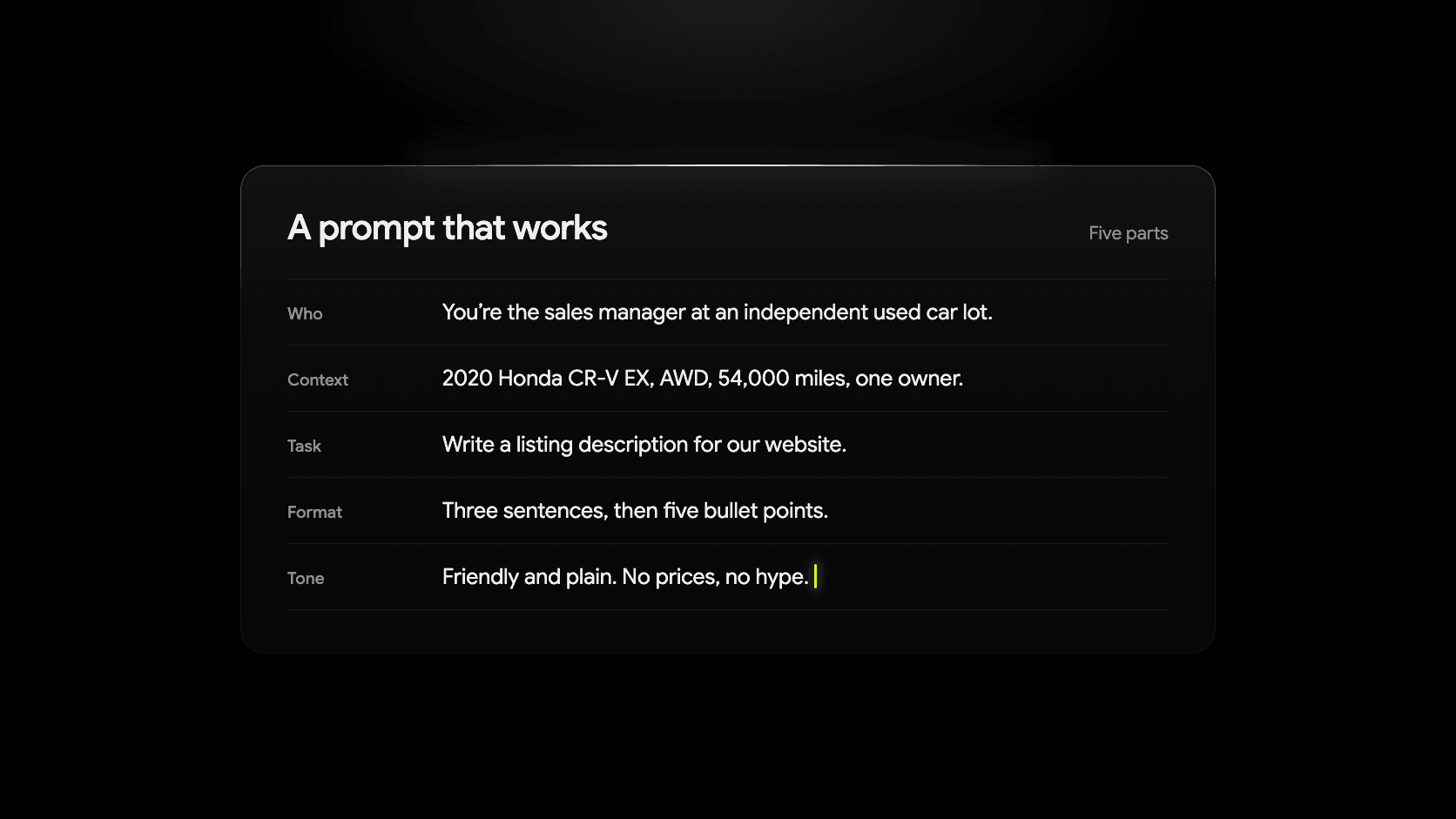
Every prompt in this post has the same five parts. You don’t need to label them, but check that each one is there.
- Who you are. “I run a small used-car lot in [town, state].” This sets the scale and the audience.
- The context. The vehicle details, the customer’s question, the review text, the job you’re hiring for. The more real information, the less the AI invents.
- The task. One clear job. “Write a vehicle description,” not “help me with my inventory.”
- The format. Length, structure and where it will be posted. “Three short paragraphs, under 120 words, for our website listing.”
- The tone. How you talk to customers. “Plain, friendly, no hype, no exclamation points.”
Before and after
A vague prompt:
Write a description for a 2019 Toyota RAV4.
A good prompt:
I run a small independent used-car lot in Zanesville, Ohio. Most of our customers are families and commuters who want something reliable and don’t like being sold to.

Write a website listing description for this vehicle: 2019 Toyota RAV4 XLE AWD, 48,200 miles, one owner, power moonroof, blind spot monitor, Apple CarPlay, new tires. Use only these facts. Don’t add features, condition claims or history I haven’t given you.

Format: two short paragraphs, under 100 words total. Tone: plain and friendly, no exclamation points, no phrases like “perfect blend.”
Here’s the kind of draft the second prompt produces (an example, not a promise of exactly what you’ll get):
This 2019 RAV4 XLE comes with all-wheel drive, 48,200 miles and one previous owner. It has a power moonroof, blind spot monitoring and Apple CarPlay, and it just got a set of new tires.
It’s a practical choice for a family or a daily commute, with room for gear and all-wheel drive for an Ohio winter. Stop by to take a look or send us a message to set up a test drive.
Still check it. Confirm the trim, equipment and mileage against the vehicle before it goes live, every time. Telling the AI not to invent facts helps, but it’s a request, not a guarantee.
ChatGPT prompts for vehicle listings
Fill in the brackets, and keep the line about using only the facts you provide.
A standard listing description:
I run an independent used-car dealership in [town, state]. Write a website listing description for a [year make model trim], [mileage] miles, with these features: [list]. Use only these facts. Don’t add features, condition claims or vehicle history I haven’t given you. Two short paragraphs, under 100 words. Plain and friendly tone, no hype.
A shorter version for a marketplace listing:
Rewrite this vehicle description for a Facebook Marketplace listing: [paste description]. Keep it under 60 words, lead with the three details a shopper would care about most, and end with “Message us to set up a test drive.”
Turning a feature list into plain English:
Here are the equipment codes and feature names from my VIN decode: [paste list]. Translate them into plain language a shopper would understand, as a short bulleted list. Skip anything that’s standard on every car, like power windows.
Catching problems before you post:
Read this vehicle description and list anything that sounds like a claim I can’t back up, like “perfect condition,” “never been in an accident” or “best price in town.” Suggest a plain replacement for each. Here’s the description: [paste].
The AI doesn’t know your car. Condition, accidents, service history and warranty come from your records, not from a writing tool.
AI prompts for social media captions
Captions are short, so tone matters most. Keep prices, payments and financing terms out unless they come straight from your listing; social posts are advertising, and our social media ideas post covers the rules.
A new-arrival caption:
Write a Facebook and Instagram caption for a vehicle that just arrived at my used-car lot in [town, state]: [year make model trim], [mileage] miles, [two or three standout features]. Under 40 words. Sound like a small-town dealer talking to neighbors, not an ad agency. No price, no payment, no financing terms. End with a short invitation to come see it. Give me three options.
A week of posts from one listing:
Here’s a vehicle listing: [paste]. Write five short social posts about it for different days: a first-look post, one about the vehicle’s best feature, one aimed at a specific kind of buyer, one answering a common question about this model, and a last-call post. Each under 40 words. No price or payment terms. Plain, friendly tone.
A non-inventory post:
Write a short Facebook post for my dealership in [town, state] about [topic: a customer pickup, a staff introduction, a community event, a seasonal tip]. Details: [facts]. Under 60 words, warm but not cheesy, no hashtags unless I give you one.
Matching your own voice:
Here are three posts we’ve written ourselves that sound like us: [paste]. Study the tone, then write a caption in the same voice for this vehicle: [details]. Under 40 words.
AI prompts for lead replies
This is where prompts save the most time and carry the most risk. Two rules:
- Never paste a customer’s personal information into a general AI tool. Use placeholders like [first name] and fill them in after the draft is written.
- Tell the AI not to invent numbers. Prices, payments, rates, trade values and approvals come from you, not the draft.
The first reply to an inquiry:
I’m a salesperson at an independent used-car dealership in [town, state]. A shopper sent this message through our website about a [year make model]: “[paste the question, with no name or contact details].” Write a reply I can send by text. Under 80 words. Answer the question if you can from these facts: [facts]. If they asked about price, payment or financing, don’t make up any numbers; say I’ll confirm the details and ask a question that moves things toward a visit. Friendly and direct, no sales pressure.
A follow-up when the shopper goes quiet:
A shopper asked about a [year make model] four days ago and hasn’t replied since my last message. Write a short follow-up text, under 40 words, that doesn’t sound pushy or guilt-trippy. Give them an easy out and one easy next step. Give me three versions.
Answering a question you get every week:
Write a reusable reply for when shoppers ask “[common question, e.g. Do you take trade-ins? / Can I buy with bad credit? / Is the price negotiable?]”. Under 60 words. Honest and plain. Don’t promise approvals, rates or specific numbers. Our actual policy is: [describe it].
Softening a tough message:
Rewrite this message so it’s kinder but still clear: “[paste what you want to say, with no customer details].” The situation is: [e.g. the vehicle they wanted sold yesterday]. Under 60 words. Offer one alternative.
Read every draft before it goes out, and change at least one thing so it sounds like you. Dealer Shock is building an AI-powered CRM with reply drafts your team reviews before sending; until then, this is the same help by hand.
AI prompts for review replies
Reviews are public, so the reply is really for the next shopper reading it. Paste the review text, but leave out the reviewer’s name and anything that identifies them.
A positive review:
Write a reply to this customer review of my used-car dealership: “[paste review, no names].” Under 50 words. Thank them for something specific they mentioned, don’t gush, and don’t use the phrase “valued customer.”
A negative review:
A customer left this review: “[paste review, no names].” Write a public reply under 80 words that stays calm, doesn’t argue, acknowledges the specific complaint and invites them to contact [role, e.g. our sales manager] directly to sort it out. Don’t admit fault for anything I haven’t confirmed, and don’t make promises about refunds or repairs.
A review that gets the facts wrong:
This review states something that isn’t accurate: “[paste review, no names].” What actually happened: [your version]. Write a reply under 80 words that corrects the record politely without calling the reviewer a liar, and that a future shopper reading it would find reasonable.
Never ask the AI to write a review for you, and never offer anything in exchange for a positive one. The FTC’s rule on consumer reviews bans both. (FTC Consumer Reviews and Testimonials Rule Q&A)
AI prompts for job posts
A job listing:
Write a job post for a [role, e.g. used-car sales consultant / lot porter / title clerk] at an independent dealership in [town, state] with [number] employees. Pay: [what you actually offer]. Schedule: [hours and days]. What the job really involves: [plain list]. Under 250 words, honest tone, no “rockstar” or “fast-paced environment.” Lead with why someone would want to work here: [your reasons].
Interview questions:
Give me eight interview questions for a [role] at a small used-car dealership. Include two about how they’d handle a frustrated customer and two that reveal whether they’ll show up on time and stay. For each, add one sentence on what a good answer sounds like.
Employment law varies by state. Have someone check a job post for pay-disclosure and anti-discrimination requirements where you are. This isn’t legal advice.
AI prompts for questions about a spreadsheet
ChatGPT and Claude both accept pasted rows, and most plans accept file uploads. This works well for inventory and marketing numbers. Don’t upload customer lists, deal jackets or anything with personal information.
Aged inventory:
Here’s my inventory with columns for stock number, year, make, model, days on lot, asking price and website views: [paste rows]. Which vehicles have been on the lot more than 45 days with low views? For each, suggest one thing to try: a photo refresh, a better description, a price check or a social post. Don’t suggest specific prices.
Where leads come from:
This is a list of leads by month with columns for source (website, Marketplace, phone, walk-in) and whether it became a sale: [paste rows, no names]. Summarize which sources produce the most sales, not just the most leads, and point out anything that changed in the last three months.
Building the formula yourself:
In Google Sheets, I have days-on-lot in column F and asking price in column G. Write a formula that highlights any row where days-on-lot is over 60, and explain it in one sentence.
Check any total or percentage against the spreadsheet itself. The AI can misread a column as easily as a person can.
How to fix an AI answer you don’t like
The first draft is rarely the one you use. Instead of starting over, reply with a short correction. The tool keeps the context and changes only what you asked:
- “Shorter.” Or give it a number: “Cut it to 60 words.”
- “Less salesy.” Then name the specific thing: “Drop the exclamation points and the word ‘stunning.’”
- “Sound like a small-town dealer, not a brand.” If it still sounds off, paste a sentence you’d actually say.
- “Give me three options.” Pick the best and say “more like number two.”
- “Use only the facts I gave you.” If it invents a feature, say so.
- “Write it for a text message.” Format changes are the fastest fix of all.
Two or three rounds of this usually beats a perfect prompt on the first try.
How to save your favorite prompts
Once a prompt works, stop retyping it.
Keep a notes file. One note with your five or six best prompts, the “who you are” line already filled in. Copy, paste, swap the brackets.
Save your setup inside the tool. ChatGPT has custom instructions (in Settings under Personalization) that apply to every chat, and Projects that keep related chats, files and instructions together. Instructions set inside a project apply only there and override your general custom instructions, so a project is a good home for “listing descriptions” or “review replies.” Claude has Projects too, with project knowledge and custom instructions that apply to every chat in that project. As of October 2026, both are available on free plans with limits: ChatGPT’s free plan allows five files per project, and Claude’s free plan allows five projects.
Either way, put your “who you are” line, your tone rules and your never-invent-facts rule in the instructions once. Then every prompt can skip straight to the context and the task. A fuller guide to writing a brand voice your whole team can use is coming later in this series.
Where Dealer Shock fits
Two of the jobs above are built into Dealer Shock, so you don’t need to copy and paste at all:
- AI vehicle descriptions do the listing job from the inventory details you already manage, and you review the draft before it goes live. This post on AI vehicle descriptions shows how it works.
- Automatic social posting turns your branded vehicle photos and listing details into Facebook and Instagram posts. It’s included with the Performance plan, and both plans include tools for creating and publishing posts by hand.
The prompts above still work for everything else, and for listings and captions if you’d rather write them yourself. The built-in option just skips retyping the vehicle details. Pricing shows what each plan includes, and you can schedule a demo to see it on your own inventory.