
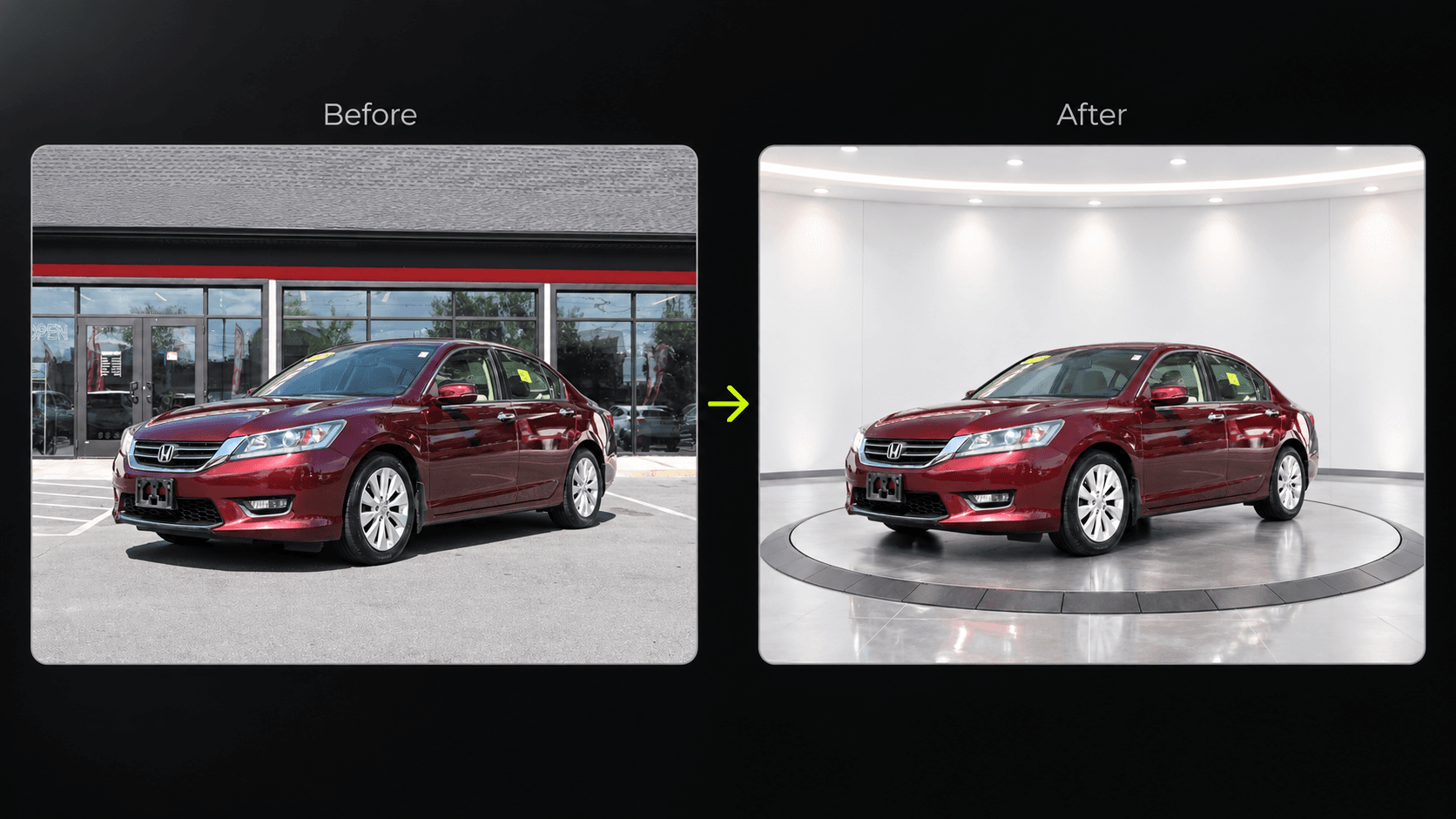
A great vehicle deserves to be the focus of its photo. A crowded lot, a busy storefront, or a distracting background can pull attention away from what shoppers came to see.
We’re working on AI vehicle background replacements to help independent dealerships give their inventory a cleaner, more consistent presentation. This post explains what the feature is meant to do, how it compares with the ways dealers handle backgrounds today, and what to check before any edited photo goes live.
What AI background replacement does
The idea is simple: start with a vehicle photo and use AI to place it against a different background. A photo taken outside your dealership could become a studio-style image, giving the vehicle more room to stand out.
The example above shows that direction. On the left, the Honda Accord sits in front of a dealership. On the right, a bright, uncluttered setting puts the attention back on the car.
The vehicle itself is the part that should not change. The job is to separate the car from what is behind it, keep the car exactly as it was photographed, and replace only the setting.
A worked example
Here is how it is meant to fit into a normal week. The vehicle is made up for this example.
A silver 2019 Ford Escape comes in on trade on a Tuesday. There’s no free spot in front of a plain wall, so it gets photographed between a pickup and the service bay door. The photos are sharp and well lit, but the pickup’s tailgate is in three of them and the bay door is in the rest.
With background replacement, those same photos could be placed against one clean setting. The Escape stays exactly as it was shot: the same paint, wheels, and stone chip on the hood. The pickup and the bay door are gone. Put that listing next to last week’s arrivals and the photos look like they came from the same dealership, even though they were taken in different spots on different days.
A more consistent look across your lot
For a dealership photographing vehicles throughout the week, consistency can be hard to maintain. Available space changes. Other cars move around. The backdrop is rarely quite the same.
Background replacement is being designed to help bring those photos together visually, with less need to find a perfect location for every new arrival. The aim is a stronger first impression while keeping the vehicle itself at the center of the image.
How it compares with doing it by hand
Dealers who want clean backgrounds today usually pick one of three routes:
- A dedicated photo spot or studio. Gives the most consistent results, but it takes space many independent lots don’t have, and every vehicle has to be moved there.
- Editing photos one at a time. Cutting a car out by hand in photo editing software can look great, but it takes skill and time for every image, and it rarely keeps up with a lot that turns inventory every week.
- Shooting wherever there’s room. The fastest option, and the reason so many listings have other cars, signs, and buildings behind the vehicle.
AI background replacement aims to give you the consistency of the first route with the speed of the third. The part that doesn’t go away is review: someone still needs to look at each photo before it is published.
What to check before you publish an edited photo
AI editing is good at finding the outline of a car, but it can get the details wrong. Before an edited photo goes live, check it against the vehicle:
- Change the background, never the vehicle. If an edit hides or softens a scratch, dent, or curb rash, the photo misrepresents the car, and the buyer will notice when they see it in person.
- Look at the edges. Mirrors, antennas, roof racks, and wheels are where cut-outs most often clip or blur.
- Check the glass. Windows and the windshield can still show the old background, or show the new one where the interior should be.
- Look at the ground and shadows. A car that seems to float, or casts no shadow, looks edited.
- Keep some real context. Shoppers buying from an independent lot often want to see where the car is. Keeping a photo or two of your actual lot alongside edited ones can help.
- Follow each site’s photo rules. Marketplaces and advertising platforms set their own image requirements. Check them before you syndicate edited photos.
What you can use today
Background replacement isn’t available yet. Today, custom photo overlays give every inventory image your dealership’s logo, colors, and look, so your vehicles carry a consistent brand wherever shoppers find them. They’re part of the custom branding and website media included with the Performance plan. Pricing shows what each plan includes.
More to come
This feature is in development. We haven’t announced which plan will include it, which backgrounds will be available, or a release date. We’ll share more about the backgrounds and workflow as it takes shape.
In the meantime, explore how Dealer Shock inventory management brings vehicle details, photos, descriptions, and publishing into one place. For the wider picture of where AI helps a small lot, see AI for car dealerships: a practical guide for independent lots.
Frequently asked questions
Can AI replace the background in car photos?
Yes. AI image tools can separate a vehicle from what is behind it and place it in a new setting, such as a clean studio-style backdrop. Results vary from photo to photo, so check edges, glass, and shadows before publishing. Dealer Shock is building background replacement for inventory photos; it isn’t available yet.
Is it OK to edit the background of a used car photo?
Changing the background is a presentation choice. Changing the vehicle is not. As long as the car looks exactly as it does in person, including any wear and damage, a cleaner background helps shoppers focus on it. Also check the photo rules of each marketplace or ad platform where you list.
When will AI background replacement be available in Dealer Shock?
We haven’t announced a date. The feature is in development, and we’ll share availability, plans, and details here and on Coming Soon when they’re ready.