
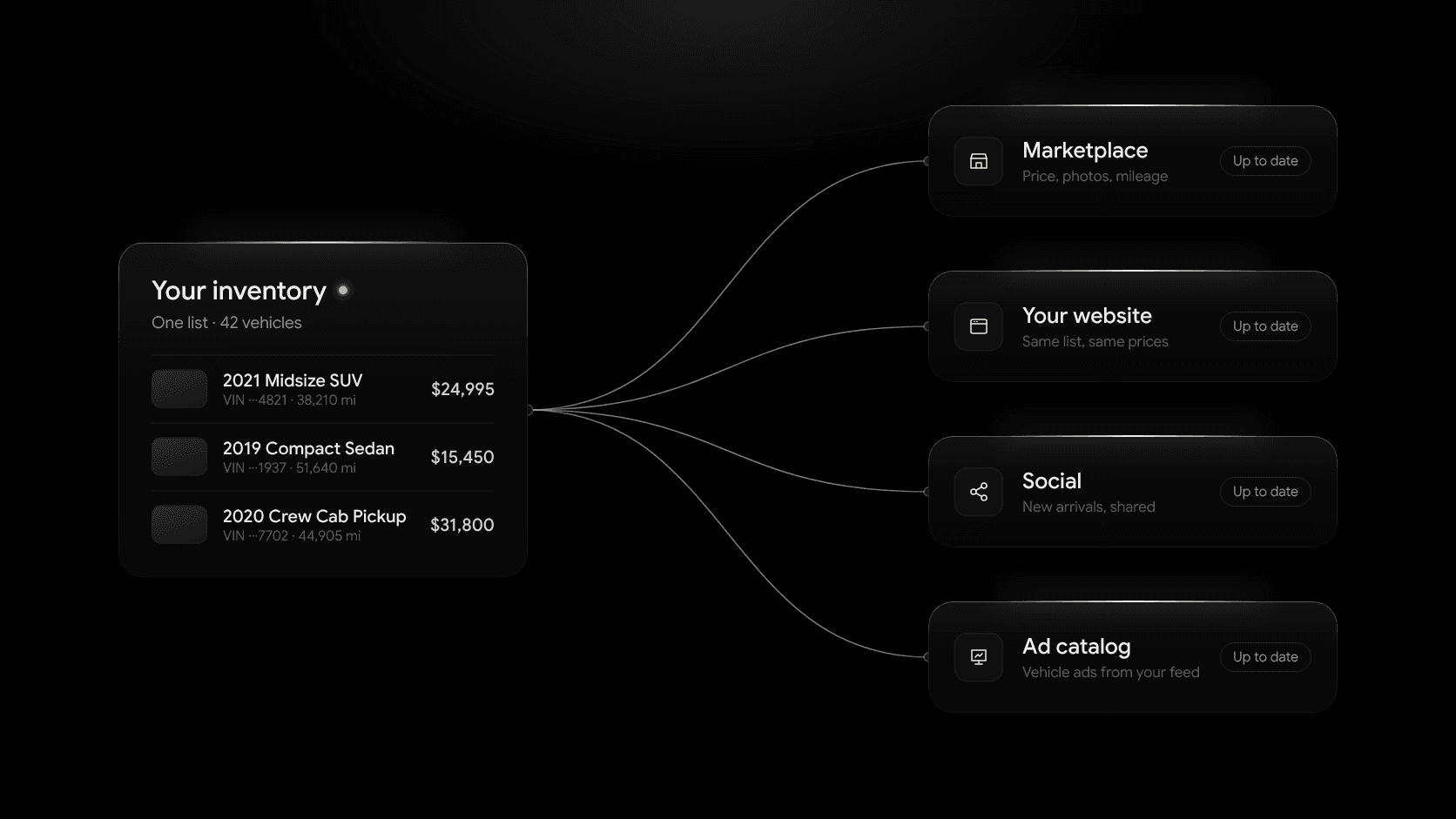
Inventory syndication is sending one list of your vehicles, kept in one place, to every website where you want them to appear, so each listing stays up to date without being entered again by hand.
Most independent dealers already syndicate, even if they don’t call it that. Your cars show on your website, on a marketplace or two, and maybe in a Facebook or Google ad catalog. The question is whether that happens from one source you trust, or from several copies that drift apart.
This guide covers how a feed works, where dealers send inventory, the problems that show up most, and a five-minute weekly check. We make inventory management software, so read our section near the end with that in mind.
How an inventory feed works
A feed is your inventory written out in a format another site can read. It travels in one of two ways:
- A file sent on a schedule. Your inventory system builds a file, often a spreadsheet-style CSV or an XML file, and drops it where the destination can pick it up. The destination reads the new file and updates its listings.
- An API connection. The two systems talk directly. Instead of a whole file, your system sends changes, such as a new vehicle, a price drop, or a sale.
Either way, the destination only knows what the last feed told it. If the feed runs once a day, a price change you make in the morning may not show there until the next run.
What travels in a feed
Every destination asks for slightly different fields, but the core is the same:
- VIN. The key that ties every copy of a listing back to one vehicle. Get it wrong and you get duplicates or mismatched photos.
- Year, make, model and trim.
- Price. Usually your advertised price. Some destinations also take a sale price or a monthly payment.
- Mileage.
- Photos. Sent as links to images, in order. The first one is usually the main photo.
- Description. Your written comments about the vehicle.
- Stock number, colors, and status. Status tells the destination whether a car is available or sold.
- A link back to the vehicle’s page on your website, for destinations that send shoppers there.
Where dealers send inventory
Most feeds go to three kinds of places:
- Marketplaces. Car-shopping sites where shoppers compare vehicles from many dealers. Each one has its own feed requirements, and some charge by listing or by package.
- Your own website. Your site should pull from the same inventory as everything else. If someone updates it separately, it will drift.
- Social and ad catalogs. Facebook and Google can both show your vehicles in ads, using a catalog built from a feed. Our guides to Facebook Marketplace for car dealers and Google vehicle listing ads explain what each one needs.
The more places you send to, the more it matters that every copy comes from one list.
Common problems and how to fix them
Stale prices
You drop a price on the lot, but a marketplace still shows the old one. Shoppers who see the higher number may skip the car. Shoppers who see a lower number may arrive expecting it.
Fix: Change prices in one place only, your inventory system, and let the feed carry the change. Know how often each destination updates so you know how long a change takes to appear.
Sold cars still showing
A sold car that stays listed brings in calls you can’t close, and it tells shoppers your listings aren’t current.
Fix: Mark vehicles sold in your inventory system the day they sell. Ask your provider whether a sold vehicle is removed from each destination or only marked sold, and how long that takes.
Missing or wrongly ordered photos
A listing goes out with no photos, or the main image is the dashboard instead of the front of the car.
Fix: Set photo order in your inventory system, not on each site. If a destination shows a placeholder, check whether the photos were uploaded before the feed ran. Many feeds send whatever is there at that moment.
Duplicate listings
The same car shows twice on one marketplace, often because it was entered once by hand and once by the feed, or because two feeds send the same inventory.
Fix: Pick one feed per destination and remove anything entered by hand. Search the marketplace for your own VINs now and then to spot doubles.
Different descriptions on different sites
One site shows your full description, another shows a cut-off version, a third shows the marketplace’s own default text.
Fix: Write the description once in your inventory system. Keep the important points in the first two or three sentences, since some destinations shorten long text.
A weekly five-minute check
Once a week, pick three vehicles: your newest, one with a recent price change, and one that just sold. Then:
- Search for each one on your main marketplace and on your own website.
- Check the price on the newest and the price-change vehicle. It should match your inventory system everywhere.
- Check the sold vehicle is gone, or marked sold, on every destination.
- Look at the first photo on each listing. It should be the one you chose.
- Read the first line of the description. It should be yours, not a default.
If anything is off, note which destination and which field. That makes the conversation with your provider short.
Questions to ask a syndication provider
- How often does the feed run for each destination? Ask for each one, since they can differ.
- What does each destination cost? Some providers include destinations in the price. Others charge per destination, and marketplaces may bill you separately.
- What happens when a vehicle sells? Is it removed from every destination, or marked sold, and how fast?
- Which systems can you import from? You want your current inventory system on the list, so you don’t enter vehicles twice.
- Can I see when each feed last ran and whether it failed? A feed that quietly stops is the most expensive problem on this list.
- Who fixes a rejected listing? Destinations sometimes reject a vehicle for a missing field. Find out who sees that and who fixes it.
Where Dealer Shock fits
Dealer Shock is our product, a website platform for independent dealerships with inventory management built in.
It imports vehicles from systems such as DealerCenter, Carsforsale.com, Frazer, AutoRevo and vAuto, so your inventory stays in the system you already use. It can export those vehicles to Cars.com, Autotrader, CarGurus, Facebook and Google. Your Dealer Shock website runs on the same inventory, so the site and the exports share one list.
Photos, descriptions and vehicle details travel together. The Performance plan adds two things that help here: AI vehicle descriptions, which write a first draft for each vehicle, and custom photo overlays, which put your branding on vehicle images. Dealer Shock isn’t a DMS, so you keep your current system for deals and accounting. See pricing for what each plan includes, or book a demo and ask us the questions above.
Frequently asked questions
What is inventory syndication?
Inventory syndication is sending one list of your vehicles to many websites, such as marketplaces, your own website and ad catalogs, so each listing stays current without being entered again by hand.
How often should an inventory feed update?
Often enough that a price change or a sale shows everywhere before shoppers act on old information. Destinations set their own schedules, so ask your provider how often each feed runs, and check it with the weekly test above.
Do I need a separate feed for each marketplace?
Usually each destination gets its own feed, because each asks for its own format and fields. A syndication provider builds those from your one inventory list, so you still only keep vehicles up to date in one place.